Chapter 7 Component architecture
This chapter describes the makeup and structure of the application components that power the City Digital Twin (CDT) platform and underpin its computational, analytical, and integration capabilities. It lays out the design logic for the ETL modules, the analytical engine, the data store, the scenario and visual blocks, the interface layer, and the tools that connect to external systems. Each component is described as a self-contained technical unit that performs its own function and fits into the platform’s architecture. The chapter also covers how the web interfaces, API mechanisms, monitoring, and security are set up — together forming a coherent, manageable digital ecosystem that scales to a specific customer’s needs.
7.1 Integration module (ETL)
The integration module — Extract, Transform, Load (ETL) — in the City Digital Twin platform is built as a set of separate, technologically distinct components that automatically load, transform, and prepare data. It is a hierarchy of microservices and processing scripts grouped into logical blocks by function.
The module’s structure includes:
- Data loading and import services — components that connect to sources (local files, APIs, databases), refresh on a schedule, and load new versions of the data;
- Transformation and normalization blocks — built as chains of scripts in R and C++ that handle recoding, fill in gaps, bring data to a single structure, and build data marts;
- A catalog of reference tables and dictionaries — a separate component that stores classifiers, unit-of-measure mappings, object types, and territorial references;
- An ETL task dispatcher — manages the run sequence, logging, storage of execution logs, and error alerts;
- A load configuration interface — lets you add new sources and set processing rules, refresh schedules, and validation parameters without changing the module code.
Technically, the ETL component is built on:
- R scripts and RMarkdown templates (for processing, visualization, and logging);
- ClickHouse (for intermediate and final storage);
- Docker containers (to isolate processes);
- Seafile (to store helper files and exports);
- GitLab (to store ETL model versions and the change history).
Each part of the module can be updated or scaled independently. This makes it easy to adapt to new tasks and add processing branches — for example, for Rosfinmonitoring formats, the fuel and energy balance (FEB), or Ministry of Agriculture departmental forms — without changing the platform’s core logic.
7.2 Analytical engine
The analytical engine of the City Digital Twin platform is a set of computational components and mathematical models built as independent modules that calculate, forecast, and simulate a range of socio-economic processes. It runs both built-in models and user-defined scenarios with high speed and reproducibility.
The analytical engine’s components include:
- A calculation models module — runs models built in R, C++, and Java in sequence, with the ability to load external scenarios, query the database, and return results in a standardized format;
- A model library — contains modules for demographics, macroeconomics, intersectoral balance (IB), shortage analysis, resilience, development indices, and more;
- A caching handler — an intermediate layer that speeds up access to repeated calculations and keeps the user interface responsive;
- A model logger — records metadata: run date, input parameters, and model version, and saves a trace of the computation.
The technical implementation is based on:
- the R language and its libraries (targets, forecast, dplyr, ggplot2, data.table, and others);
- batch execution of calculations through Rscript;
- communication with ClickHouse to read input data and write final results;
- interactive Shiny dashboards to visualize results;
- RMarkdown to export intermediate analytics.
The analytical engine also includes components that validate data and mathematical assumptions, which rules out invalid scenarios and warns the user.
This structure delivers modularity, scalability, and the ability to plug in new models without touching other parts of the system. That makes the analytical engine a flexible, extensible foundation for the computational processes within the CDT.
7.3 Data and results store
The data and results store in the City Digital Twin platform is built on ClickHouse, an industrial-grade analytical database management system designed to hold large volumes of structured, time-series, and aggregated data. The store processes analytical queries quickly and stays scalable and stable while handling many parallel user sessions and computational tasks.
The store builds and maintains these key structures:
- data marts of primary and normalized data produced by the ETL pipelines;
- calculation layers — with model results, forecasts, and aggregated indicators;
- scenario parameters and sensitivities — for comparative analysis and version control;
- a change history and control versions — which track who produced a given result and when.
ClickHouse was chosen as the core technology because it can process millions of rows in milliseconds, run aggregations on the fly, and store compact versions of every intermediate calculation and final result.
The store is the heart of the platform’s logic: all data, model results, indicator values, and reporting information flow through it. It is integrated with the analytical engine, visualization, report generation, and the API, keeping data consistent at every level of CDT use.
7.4 Scenario and optimization module
The scenario and optimization module of the City Digital Twin platform supports configurable modeling of different socio-economic development paths, lets you compare scenarios, and finds optimal solutions within given constraints and resources. It is built for governing bodies that want more than a single forecast — they want to compare trajectories and pick balanced solutions.
The module’s components include:
- A scenario builder — lets you define and save custom scenarios: input parameters, control variables, funding levels, constraints, and assumptions;
- A version and comparison manager — builds a change history and lets you compare scenarios against each other (for example, a business-as-usual path versus an investment path) by key indicators;
- A resilience assessment module — calculates how resilient each scenario is, based on its sensitivity to changes in external parameters;
- An optimization block — finds trade-off trajectories based on target indicators, constraints, infrastructure limits, and performance requirements.
Technically, the module uses:
- applied models (optimization, regression, and balance models);
- caching and fast recalculation mechanisms;
- a flexible parameterization system integrated into the admin panel.
The module supports exporting results in both machine-readable and visual formats, generating supporting explanations, documenting scenarios, and exporting to reporting systems.
The scenario and optimization module is built into the overall CDT architecture and delivers controlled flexibility in how you plan and justify territorial development programs and departmental decisions.
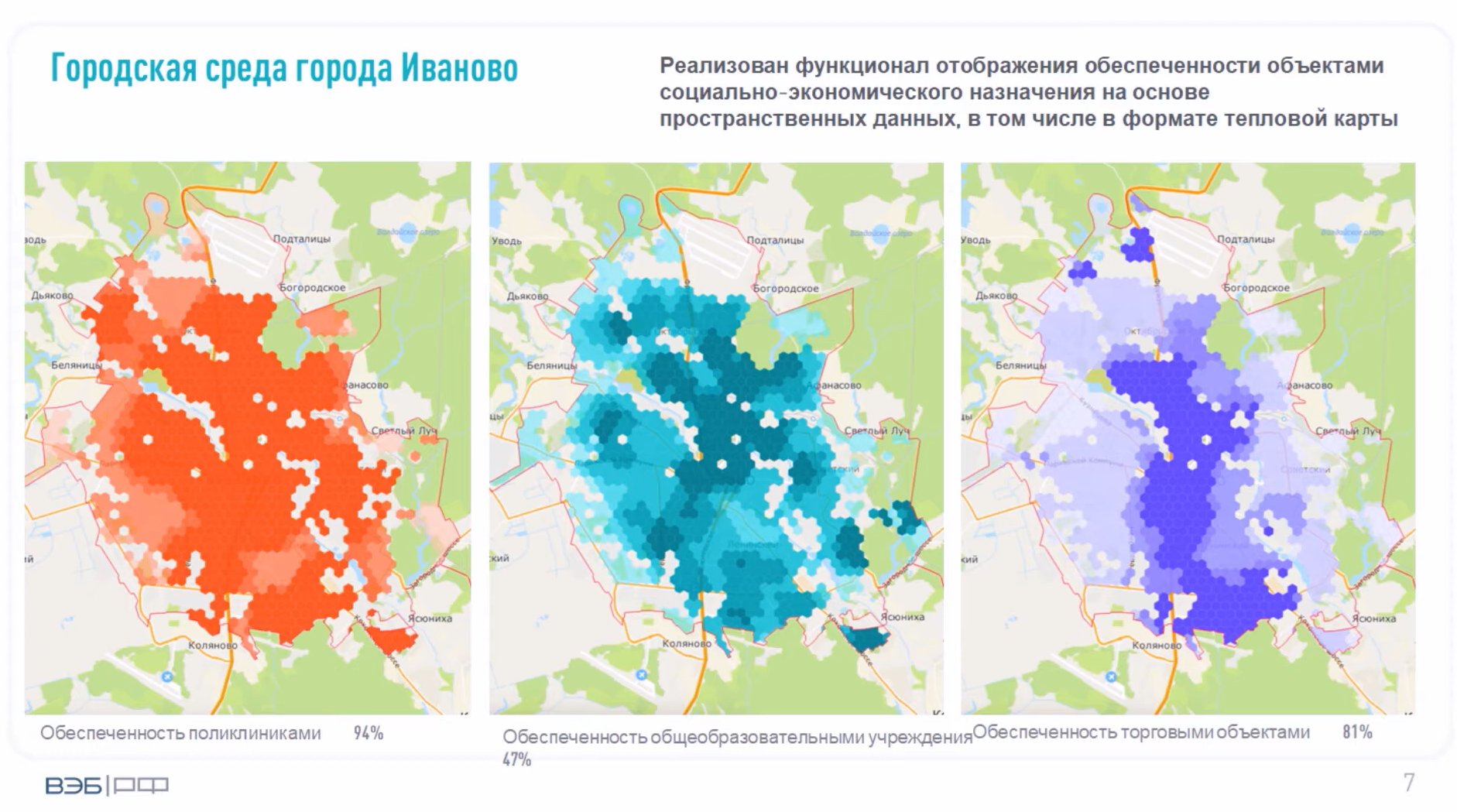
Figure 10 — Service-coverage heat maps for the city of Ivanovo: clinics, educational facilities, and retail outlets
7.5 Web interfaces and portals
The web interfaces and user portals of the City Digital Twin platform give users an accessible, clear way to work with data, models, and calculation results. They are the key tool for users at every level — from specialists and analysts to the heads of government bodies.
The interfaces take the form of web panels and integrated applications available through secure browser access. A distinctive feature of the CDT is that the interface’s structure, logic, and visual elements are designed specifically for each customer’s requirements. This lets the platform precisely reflect the current tasks and information formats typical of a given region, industry, or agency.
Key capabilities of the web interfaces include:
- navigation by scenario, period, and territory;
- display of indicators as tables, charts, and indicators;
- built-in forms for exporting data and reports;
- visual panels for comparing options and deviations from target values;
- managing calculations, running scenarios, and viewing version history.
Each portal can include several access levels (for example: “Analyst,” “Manager,” “External user”) and can offer dedicated panels for monitoring, reporting, sensitivity analysis, or decision documentation.
Technically, the web interfaces are built with modern open-source visualization and front-end tools. They communicate with the database and the analytical engine through the API, require no installation on user devices, and run in a local or secured environment.
Examples of deployed interactive dashboards: - Digital twin of transport infrastructure - Digital twin of green spaces and ecology - Financial calculator for regional development - Territorial development parameter calculator - Investment attractiveness profile - Social impact assessment model - General CDT interface
Thanks to the flexibility of the interface layer, the CDT can adapt to customers at any maturity level — from compact analytical panels to complex management portals embedded in a region’s or industry’s IT landscape.
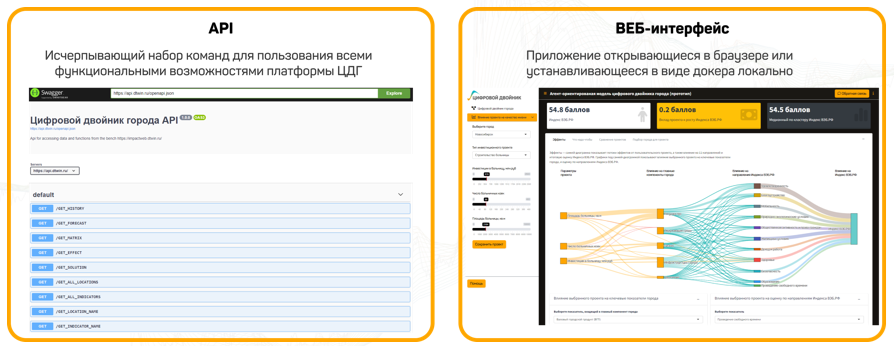
Figure 13 — Interfaces for accessing the CDT platform: the API and a web application with an agent-based model of the city
7.6 API and integration components
The API and integration components of the City Digital Twin platform provide end-to-end communication with external information systems, digital twins of physical objects, and industry platforms, putting into practice an architectural principle of openness and extensibility. These components let you embed the CDT into a customer’s existing IT landscape without duplicating functions and while preserving end-to-end data logic.
The integration layer is built on:
- A REST API — a universal mechanism for requesting and transmitting data that provides access to reference tables, calculated indicators, scenario parameters, and aggregates;
- JSON and XLSX export — support for machine-readable formats, including exporting tabular views for external reports;
- Import gateways — components that process incoming streams, including automatic checks of structure and allowed values and mapping to internal classifiers;
- Cross-environment exchange components — which synchronize data across the central, regional, and local deployments of the platform;
- Interfaces for exchange with external systems — the ability to connect to information and analytical systems, BI platforms, and enterprise digital twins, including through adaptable API gateways.
All integration mechanisms support access control, authentication, and versioning. You can enable periodic export or import on a schedule, by trigger, or by administrative action.
The integration components run independently of the internal calculation logic, which lets you adapt the CDT to the various working protocols of government bodies, agencies, and corporations. When needed, you can customize formats or set up secure exchange channels inside the customer’s perimeter.
In short, the API and integration mechanisms make the CDT compatible with digital ecosystems, providing end-to-end digital connectivity, keeping data consistent, and closing the gaps between systems.
7.7 Monitoring and security
The monitoring and security system of the City Digital Twin platform is built as a standalone component that ensures technical stability, checks that calculations are correct, audits user actions, and meets information-protection requirements, including possible deployment in a secured environment.
Monitoring
The monitoring functionality includes:
- tracking the status of all key modules (ETL, the store, analytics, the API, and the interfaces);
- logging errors, delays, and deviations from the expected procedure;
- automatic alerts to the administrator about failures and schedule violations;
- technical status dashboards — load, availability, number of active sessions, and task execution time;
- system logs for script execution, model versions, and control calculations.
Security
The platform’s security components include:
- access control at the level of users, scenarios, modules, and data;
- a user action log (audit);
- the ability to integrate with internal authentication and encryption services;
- support for deployment in a closed perimeter (on the customer’s servers) using certified software (including Astra Linux);
- protection against unauthorized access to the REST API and external gateways through tokens, signatures, logging, and rate limiting.
The monitoring and security mechanisms build trust in the platform, make it reliable in operation, and ready for use in processes that are critical to government or business.
All rights reserved Digital Twin LLC All rights reserved Digital twin LLC